Vyakti Business

Billing apps are too much. Spreadsheets are too slow. This sits in between.

For people who sell from home, on Instagram and WhatsApp, and at exhibition stalls. Here is each part of the app, the everyday problem it solves, and an example. Every screen shown is from the app, with a made-up shop in it.

Free for one month. No card or payment details needed.

Selling at a counter The price you agreed Orders to deliver Packing list Invoices Stock Stickers Stock count Money owed to you Cash on delivery Purchases and expenses Exhibitions and sales Reports Starting out Backup and privacy Plans

First, what it is not

Not an accounting package

Accounting apps are built for accountants: ledgers, vouchers, journals. Many small sellers open one, feel lost, and go back to a notebook and a calculator.

Vyakti Business does a smaller job well: what did I sell, what do I have left, who has paid and who has not. It keeps those things right while you get on with selling, and gives your accountant an Excel file when the year ends.

It works in English, Marathi and Hindi.

Selling at a counter

Tap what is sold, take the money, done

Made for a busy stall, where there is a queue and no time to type.

Without itYou write each sale in a notebook, or try to remember it. By evening the notebook and the cash box do not agree, and you do not know what is left to sell tomorrow.
  • Tap a product to add it, or scan its sticker with the camera
  • No customer name needed for a walk-in
  • Cash, UPI, card, or part in one and part in another
  • Stock goes down the moment the sale is saved
  • A bill is ready to share or print straight away
For exampleAt the Sunday flea market a customer picks a dupatta and a kurti. Two taps, "Cash", done. It took less time than finding the notebook.
A new counter sale with two items in it

The price you agreed

"Make it a thousand." Type 1000.

When a customer bargains, type the price you settled on. The app works out the discount.

Without itThe bill comes to ₹1,100 and the customer says "make it a thousand". Now you have to work out the discount in your head while three other people wait.
  • Type the final price and the discount is worked out for you
  • Or give a discount as an amount, or as a percentage
  • The app remembers which way you like to work
  • The bill shows the discount, so the customer sees what they saved
For exampleA customer at your stall asks for ₹1,000 on a ₹1,100 bill. You type 1000. The bill shows a discount of ₹100, and your day's total is right without any arithmetic.
A sale where the final price was typed and the discount worked out

Orders to deliver

From the chat to the customer's door

For orders that come on WhatsApp or Instagram and go out by courier.

Without itThe order is somewhere in a chat. The address is in another message. Whether it was packed, sent or paid for is in your memory.
  • Paste the name, phone and address from the chat in one go
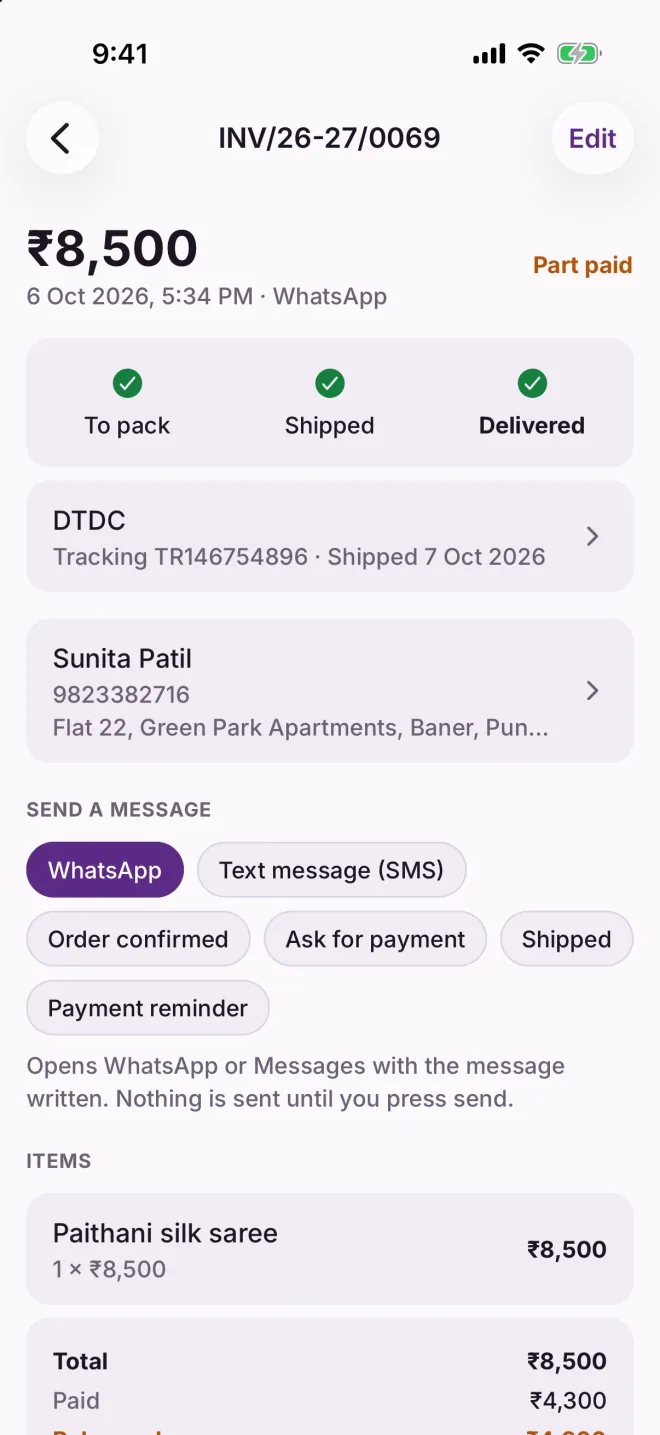
  • Each order moves from "to pack" to "shipped" to "delivered"
  • The goods are kept aside for the order as soon as it is taken
  • Note the courier and tracking number, and print the address label
  • Send "order confirmed" or "shipped" on WhatsApp or SMS with one tap
  • Take back some or all of an order, with the stock and the refund kept in step
For exampleSunita orders a saree on WhatsApp at night. You take the order in a minute. In the morning it is on your packing list; in the afternoon one tap tells her it has shipped, with the tracking number.
An order showing its stages, courier details and ready-made messages

Packing list

Know what to take off the shelf

One list of everything today's orders need, and then what goes in each parcel.

Without itYou open each order in turn, walk to the shelf, come back, and open the next one. A parcel goes out with one item missing.
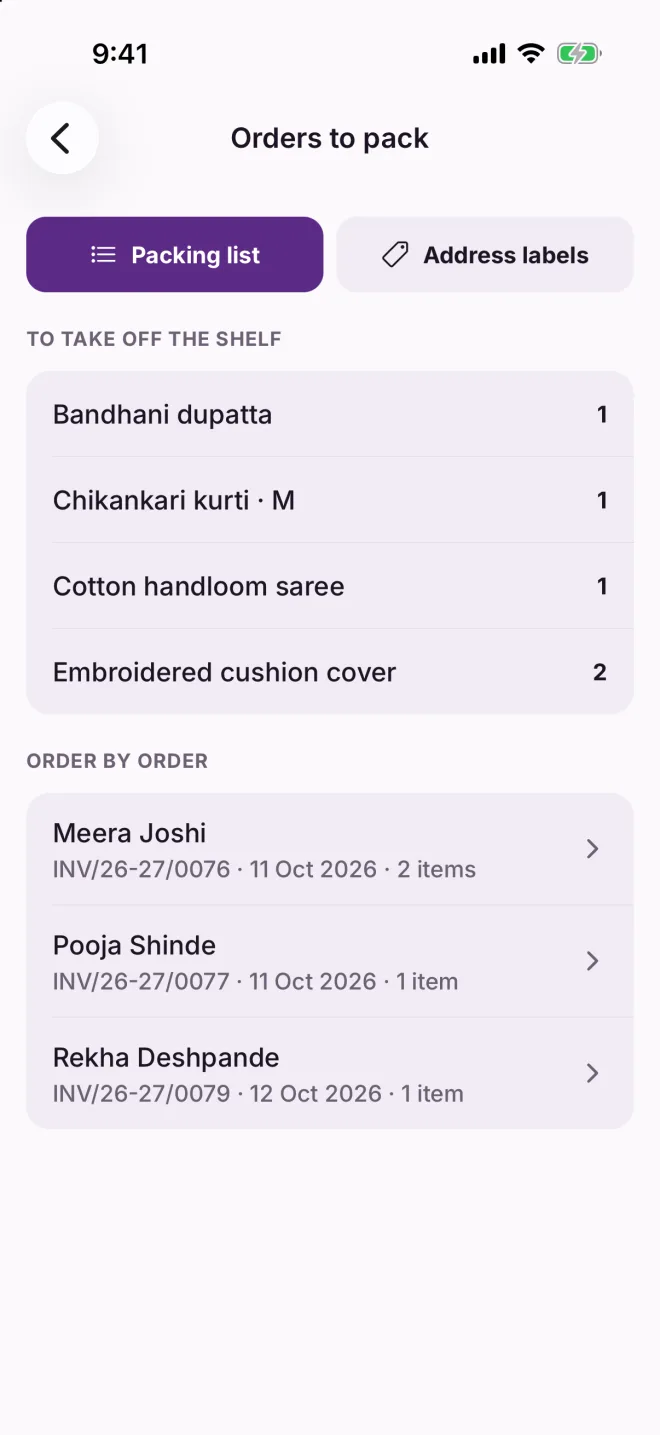
  • Everything to pack, added up across all waiting orders
  • Then each order with its own items
  • Print the list, or print all the address labels together
For exampleThree orders are waiting. The list says: one dupatta, one kurti in M, one saree, two cushion covers. You collect them in one trip and pack all three.
The packing list: items to take off the shelf, then each order

Invoices

A bill your customer can read, and pay from

A clean invoice as a PDF, with a UPI code for the exact amount still to be paid.

Without itYou send a photo of a handwritten bill, then your UPI number in a separate message, then answer "how much was it again?"
  • Shared as a PDF on WhatsApp, or printed
  • Your UPI code on the invoice: the customer scans and pays the right amount
  • Layouts for a full page or a narrow receipt printer
  • GST stays out of sight until you switch it on; then tax invoices with CGST, SGST or IGST
  • A change after sending is kept as a numbered revision, never hidden
For exampleSunita has paid half. Her invoice shows the total, what she has paid, the balance of ₹4,200 and a code to scan. She pays the rest that evening without asking you anything.
An invoice with the business name on a coloured band, the amounts, and a UPI code to scan

Stock

Always know what you have

Stock goes down as you sell and up as you buy. You never update it by hand.

Without itA customer asks for the kurti in L. You say yes. Then you search three bags and find it was sold last week.
  • What is free to sell, and what is promised to an order
  • Sizes, colours, or any other variation you use
  • A warning when something is running low
  • Damaged and missing pieces are counted separately, not lost
  • Every change is kept, so you can see where each piece went
For exampleThe Chikankari kurti page shows: M, four available and one promised. L, three available. You answer the customer before she finishes typing.
A product page showing stock for each size

Stickers

Price stickers, without a label printer

Print stickers on the A4 sticker sheets sold in any stationery shop.

Without itYou write prices on small stickers by hand the night before an exhibition. Some fall off, and at the stall you cannot remember what the kurti cost.
  • Name, price and a code on each sticker
  • A QR code or a barcode that the app scans at the stall
  • One sticker each, or as many as you have in stock
  • Sheets of 21, 24, 40 or 65 stickers
  • Skip the places already used on a half-finished sheet
For exampleBefore the flea market you print two sheets on your home printer. At the stall you point the phone at a sticker and the item is in the bill.
Choosing a sticker sheet and how many stickers to print

Stock count

Count the shelf, correct the records

Walk through your stock once in a while and let the app sort out the differences.

Without itYou suspect the numbers have drifted, but checking means a notebook, a calculator and an afternoon.
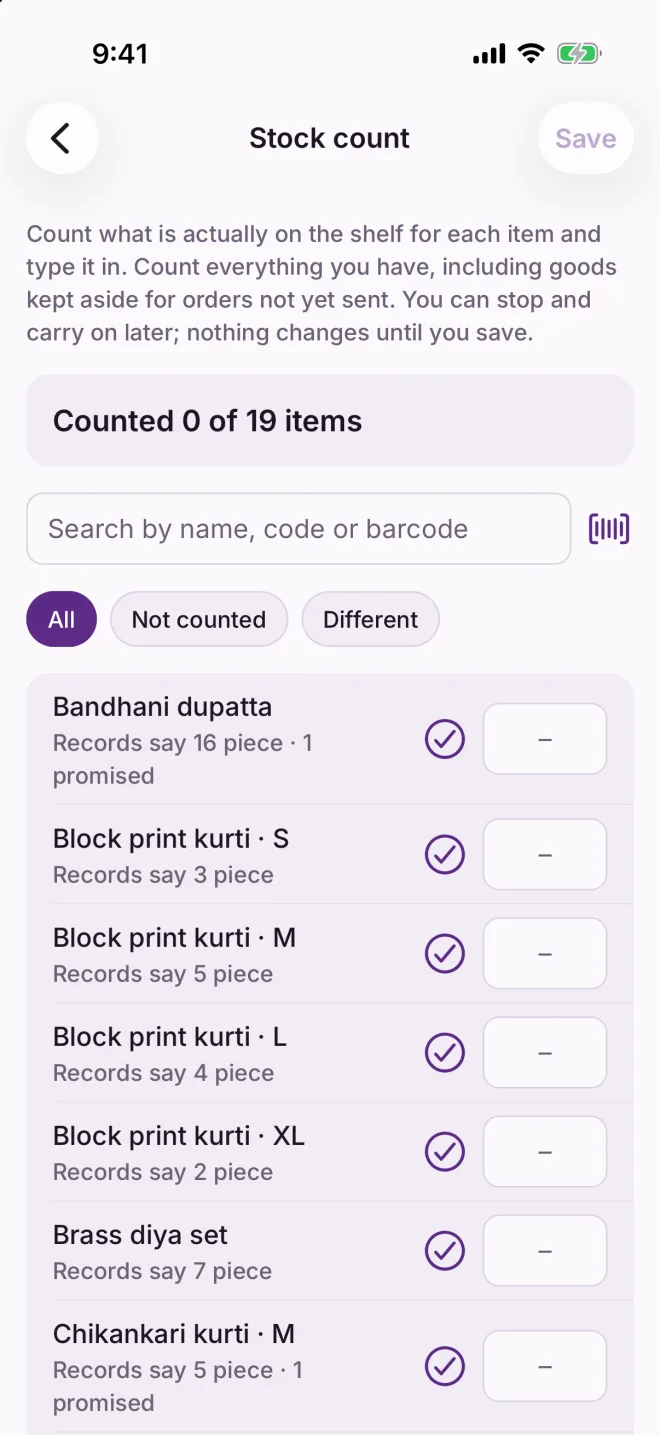
  • Every item with what the records say
  • Tap the tick where it matches, type the number where it does not
  • Or scan stickers, one scan for each piece
  • Stop and carry on later; nothing changes until you save
  • Missing pieces are marked "not found", so you can see them, not just lose them
For exampleAfter the exhibition you count what came back. Two items are one short each. The app marks those two pieces as not found and everything else stays as it was.
The stock count screen listing items with what the records say

Money owed to you

Who owes you, without the awkward guessing

Part payments and credit are tracked for each customer, with a polite reminder ready to send.

Without itA regular customer says "I will pay the rest next week". Three weeks later you are not sure whether she did, and it feels rude to ask.
  • What each customer owes, across all their bills
  • Part payments, each with its date and how it was paid
  • A payment reminder with the amount and your UPI ID, ready on WhatsApp or SMS
  • Refunds and returns taken off automatically
For exampleThe list shows three customers owing ₹7,060 between them. You open Sunita, tap "Payment reminder", read the message and press send in WhatsApp.
Money owed to you: three customers and what each owes

Cash on delivery

Know what each courier is holding

Cash-on-delivery money is yours, but it sits with the courier for days. Keep count of it.

Without itThe courier pays you a lump sum every week or two. You have no way to check which orders it covers, or whether one was missed.
  • Every delivered and in-transit order the courier has yet to pay for
  • Grouped by courier, with the total for each
  • Tick off the orders when the money arrives
For exampleDelhivery sends ₹4,410. The app shows exactly two orders adding up to that. You tick both, and DTDC's ₹2,030 is still listed as pending.
Money with couriers, grouped by courier

Purchases and expenses

What it cost you, as well as what it sold for

Record what you buy from vendors and what you spend to run the business.

Without itYou know roughly what you sold this month. What you kept is another matter.
  • Purchases from vendors add to stock and remember the cost
  • What you owe each vendor, and what you have paid
  • Expenses such as packaging, delivery, stall rent and advertising
  • A photo of the bill or receipt kept with the entry
For exampleThe month shows ₹5,269 spent: the stall fee, the tempo, packaging twice and one boosted post. You had forgotten the tempo.
The expenses list for the month

Exhibitions and sales

Was that exhibition worth it?

Give a stall or a festival sale a name, and count its sales and its costs together.

Without itThe stall fee was ₹2,500 and the weekend felt busy. Whether you came out ahead, you never worked out.
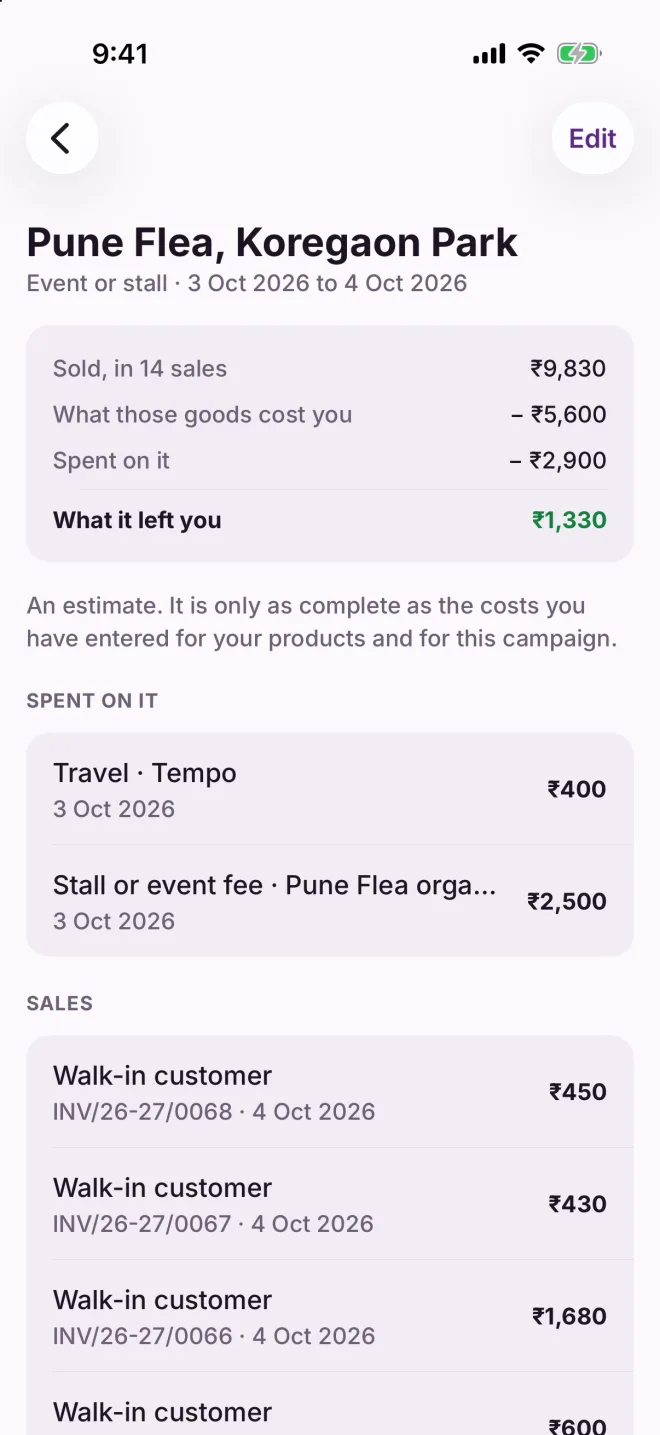
  • Tag each sale and each expense with the event
  • See what was sold, what those goods cost you, and what you spent
  • One figure at the end: what it left you
For examplePune Flea: ₹9,830 sold in 14 sales. The goods cost ₹5,600 and the stall and tempo ₹2,900. It left you ₹1,330. Now you can decide about next month.
An event page showing sales, costs and what it left

Reports

Your business, in plain sentences

Each report starts with one sentence that tells you what you need to know.

Without itThe numbers exist somewhere, but getting an answer means a spreadsheet and an evening you do not have.
  • Sales, best sellers, stock, money owed, expenses, an estimate of profit and more
  • Today, this week, this month, this year, or all time
  • Compared with the period before
  • Share any report as a PDF, or as an Excel file
  • Export everything to Excel for your accountant
For exampleYou open Best sellers: "Paithani silk saree brought in the most: ₹16,500." You order two more from your vendor that afternoon.
The best sellers report with a bar for each product

Starting out

Bring your list, do not retype it

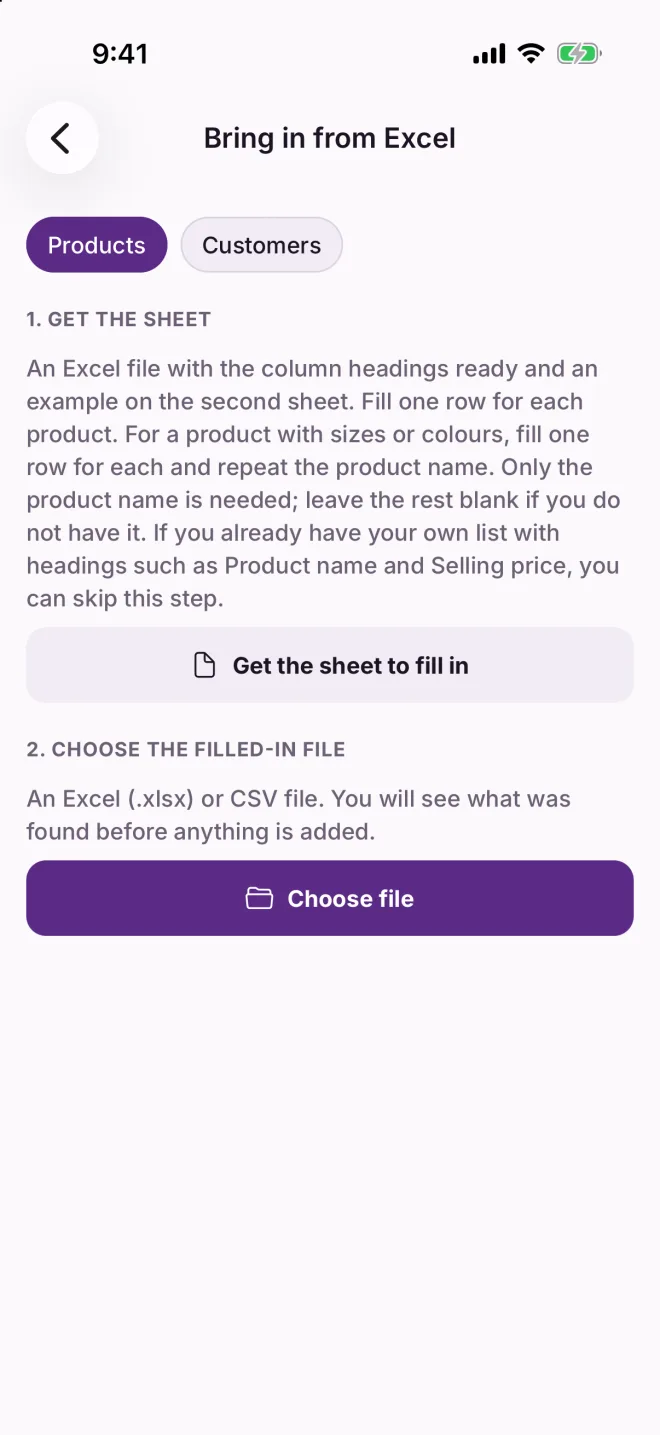
Add your products and customers from an Excel sheet.

Without itYou already have a price list in Excel. Typing eighty products into a phone, one by one, is the reason you never start.
  • The app gives you a sheet with the headings ready and an example
  • It shows what it found before adding anything
  • Rows with a problem are listed with the reason
  • Nothing already in the app is changed, so trying twice is harmless
For exampleYou fill in forty products on your laptop over tea, send the file to your phone and choose it. Thirty-eight come in; two are listed with what is wrong.
The screen for bringing in products or customers from Excel

Backup and privacy

On your phone, backed up to your own cloud

Your sales and customers are yours. We never hold them.

Without itYour whole business is in one phone. If it is lost or breaks, so is two years of records.
  • Works without internet; everything is stored on your phone
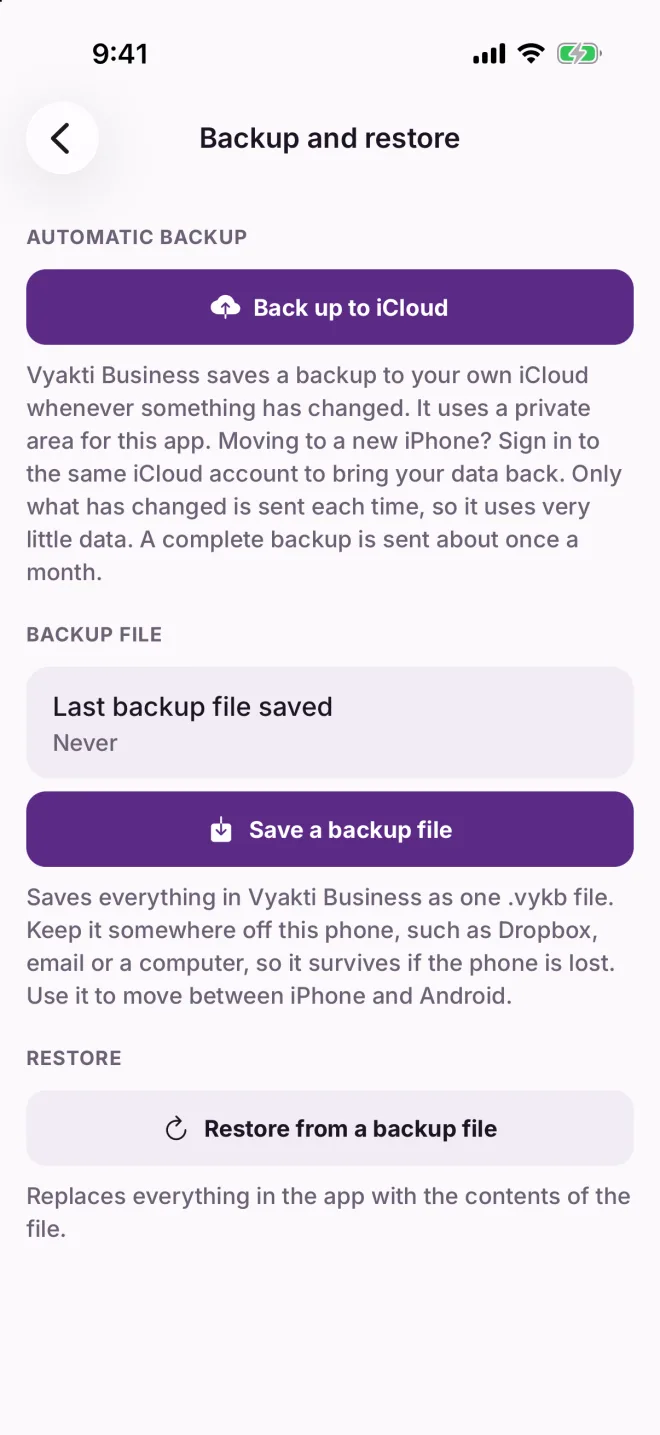
  • Backs up to your own iCloud or Google Drive, sending only what has changed
  • A full backup about once a month, and whenever you ask
  • Tells you at once if a backup fails
  • Save a backup file yourself whenever you like, and use it to move between iPhone and Android
  • No account to create, and nothing to sign in to
For exampleYour phone falls in water during the monsoon. On the new phone you install Vyakti Business, restore, and yesterday's sales are there.
The backup and restore screen

Plans

Three ways to pay, everything included

Every plan starts with one month free. Everything is included, and we ask for no payment details until you choose a plan.

 Monthly
₹99 a month
Yearly
₹990 a year
Lifetime
₹9,990 once
Every feature on this page
Products, customers and salesNo limitNo limitNo limit
How you payEach monthOnce a year, two months freeOne payment
RenewsMonthly, until you cancelYearly, until you cancelNever

If you stop paying, your records stay on your phone: you can still see them, export them and back them up.

Vyakti Business and the Vyakti personal CRM are separate apps, each with its own free month and its own plan.

Try it with your own products in it

Vyakti Business is being tested with sellers now. Tell us you are interested and we will write to you when it is ready. Your first month will be free.

Request early access